Category: Tech

  • Debian12 無人值守升級Plex

    由於Plex 更新的頻率過高,時不時的就會跳出來提醒,我想既然Debian 有自動升級,那就把Plex 也配上,大致過程如下:

    第一步,添加plex 的repo 到debian 作業系統,請參閱官方說明:

    https://support.plex.tv/articles/235974187-enable-repository-updating-for-supported-linux-server-distributions

    第二步,啟用debian 的無人值守升級,

    apt-get install unattended-upgrades apt-listchanges

    第三步,將plex 添加到無人值守升級的配置裡面,這裡有點怪,因為官方文件語焉不詳,檢索了一些文件後,應該是這樣:

    使用apt-cache policy 來獲取要添加到配置文件中的參數:o=Artifactory,a=public

    https://downloads.plex.tv/repo/deb public/main amd64 Packages
    release o=Artifactory,a=public,n=public,l=Artifactory,c=main,b=amd64
    origin downloads.plex.tv

    然後將這兩個參數加入到unattended-upgrades 的配置

    vi /etc/apt/apt.conf.d/50unattended-upgrades

    o=Artifactory,a=public --> "origin=Artifactory,codename=public";

    Unattended-Upgrade::Origins-Pattern {
    "origin=Artifactory,codename=public";

    unattended-upgrade --dry-run --debug

    然後過兩天再觀察一下,Plex server 已經自動升級到最新版本。

  • How to configure AWS SES with Postfix MTA

    眾所周知email spam是internet上最讓人討厭的東西,所以很多雲端服務包括aws都會有一個默認的限制,從instance不能發送郵件出去,需要提交工單到客服那邊人工開通。

    但是有時候我們只是需要測試一下application的email發送功能怎麼辦呢,難道去叫客服開通嗎?

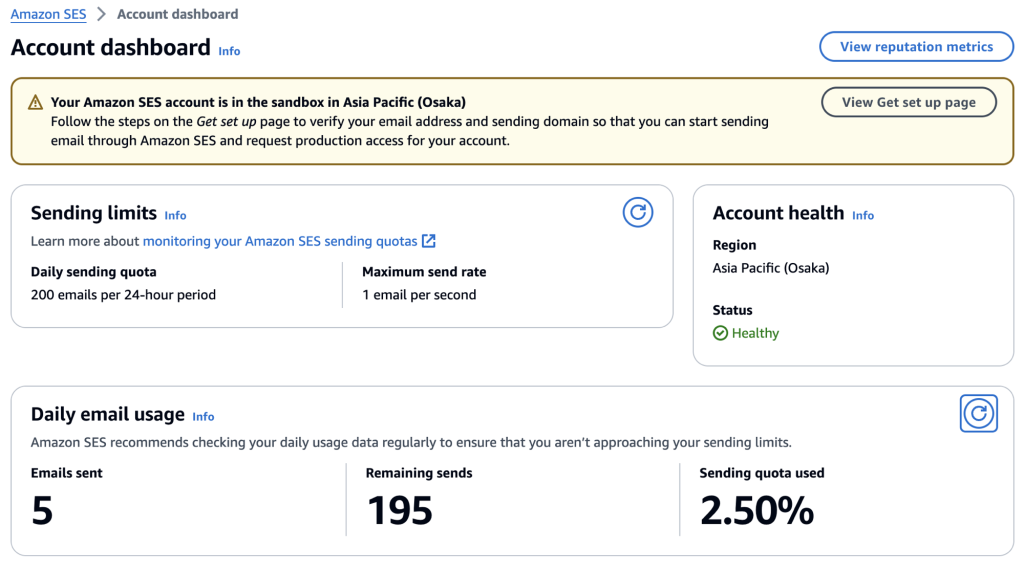
    這個時候我們可以使用postfix來把aws的ses service當作email relay就可以了,沒有申請到正式服務之前的ses會運行在sandbox,有一些限制,比如只能發送email到驗證過的domain或是email address,這很簡單,我只需要驗證一下就可以,aws會發送一封email到郵箱來驗證,點他。至於domain的部分,則是需要增加三條cname記錄,等上一兩個小時就可以。

    至於發送數量和頻率,則限制在每二十四小時200封email,每秒鐘一封。

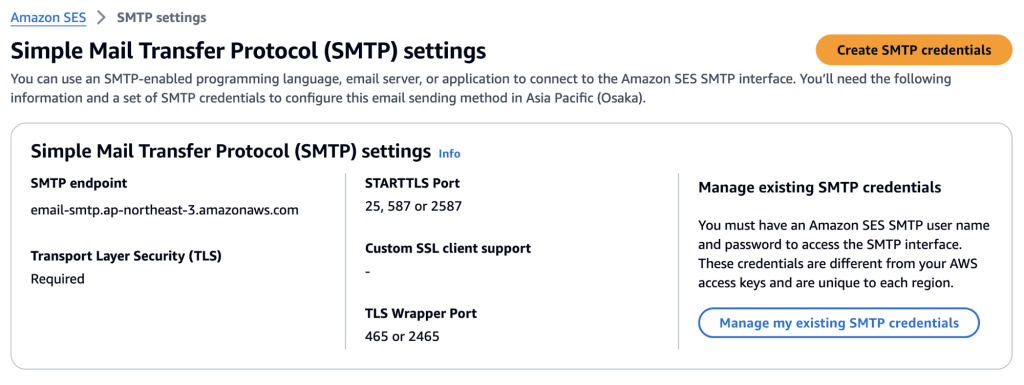
    當email address和domain的驗證都完成,這個時候需要進行smtp 的配置,至少要有個username和password吧,從webconsole來配置同樣很簡單,點擊Create SMTP credentials的時候,他就會自動在IAM中創建最小權限的用戶以及access key作為smtp的password。

    在aws創建好ses資源,接下來就是在instance上配置postfix的部分,

    以Amazon linux 2023為例,首先安裝必要的組件:

    dnf install postfix cyrus-sasl-plain -y

    然後為postfix 增加一點點配置,請注意改成你自己的domain:

    postconf -e "relayhost = [email-smtp.ap-northeast-3.amazonaws.com]:587" \
    "smtp_sasl_auth_enable = yes" \
    "smtp_sasl_security_options = noanonymous" \
    "smtp_sasl_password_maps = hash:/etc/postfix/sasl_passwd" \
    "smtp_use_tls = yes" \
    "smtp_tls_security_level = encrypt" \
    "smtp_tls_note_starttls_offer = yes" \
    "myhostname = aws.bbken.org" \
    "mydomain = bbken.org" \
    "smtp_tls_CAfile = /etc/ssl/certs/ca-bundle.crt"
    
    vi /etc/postfix/sasl_passwd
    
    [email-smtp.ap-northeast-3.amazonaws.com]:587 AKIJJ6XRR6XR6XR6XR54:jKKDeblcjKKDeblcPuPGYKDeblcPuPGYuPGYcVqnE3y
    
    chmod 600 /etc/postfix/sasl_passwd
    
    postmap -v hash:/etc/postfix/sasl_passwd
    
    systemctl enable postfix
    
    systemctl start postfix

    最後我們可以進行一點點測試:

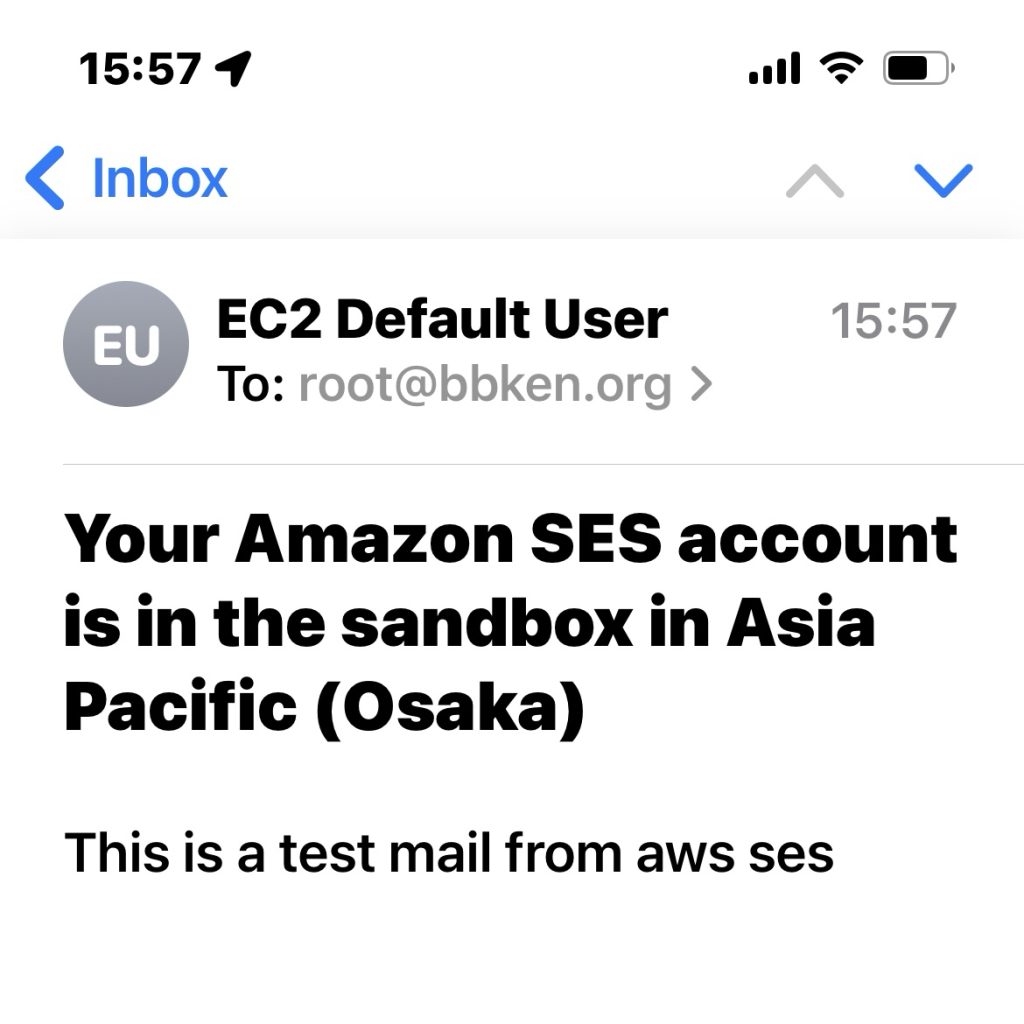
    sendmail -vv root@bbken.org

    或者

    echo 'This is a test mail from aws ses' | mail -s 'Your Amazon SES account is in the sandbox in Asia Pacific (Osaka)' root@bbken.org

    如果需要發送email到別的domain,也就是任意郵箱,那麼需要在ses 服務裡面Request production access。

    參考文件:https://www.cyberciti.biz/faq/how-to-configure-aws-ses-with-postfix-mta/

  • Compile latest redis on Amazon Linux 2023 and configure with systemd

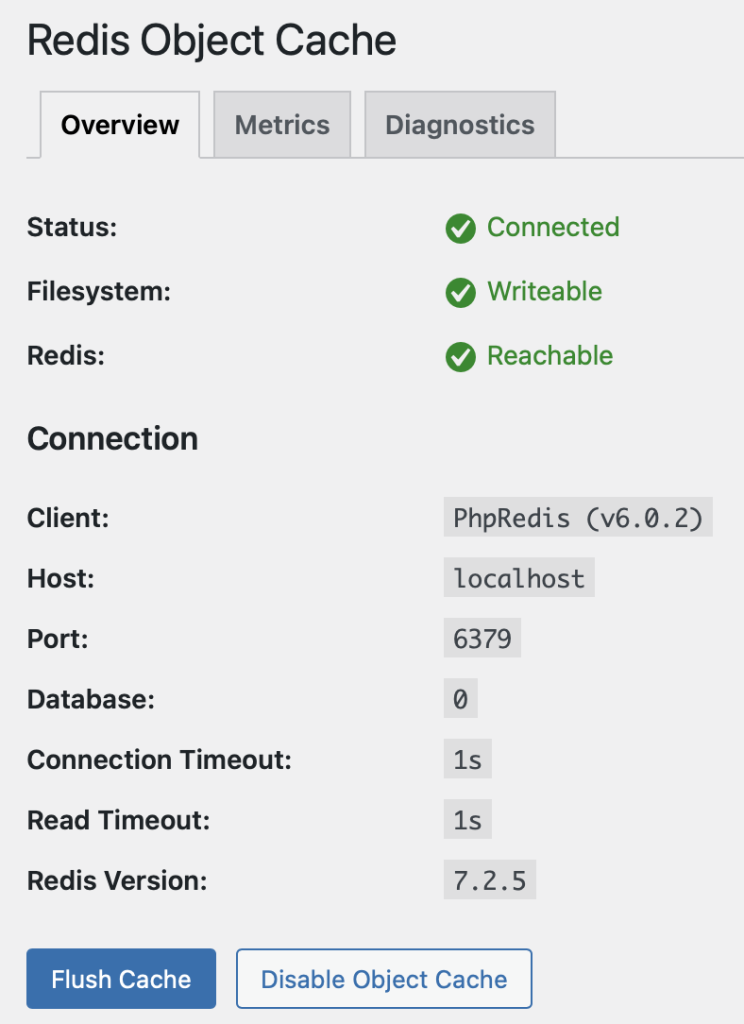
    因為AL2023 默認repo內只有redis6 沒有redis7,所以很多人都希望可以自行安裝redis7,但編譯安裝後主要的問題是無法自啟動,本文主要解決自啟動的問題。

    獲取並安裝必要的組件:

    dnf install openssl-devel gcc tcl systemd-devel -y
    wget http://download.redis.io/redis-stable.tar.gz
    tar zxf redis-stable.tar.gz
    cd redis-stable

    compile 時需要加入systemd的支持:

    make BUILD_TLS=yes USE_SYSTEMD=yes
    make test
    make install

    編輯一下默認的配置文件:

    vi redis.conf

    pidfile /var/run/redis/redis_6379.pid
    dir /var/db/redis

    cp redis.conf /etc/

    添加必要的OS level user

    groupadd redis
    useradd -g redis redis

    edit the amazon linux version redis6 startup service file and copy to /etc/systemd/system/redis.service:

    —我是分割線—

    [Unit]
    Description=Redis persistent key-value database
    After=network.target
    After=network-online.target
    Wants=network-online.target
    [Service]
    ExecStart=/usr/local/bin/redis-server /etc/redis.conf --daemonize no --supervised systemd
    ExecStop=/usr/libexec/redis-shutdown
    Type=notify
    User=redis
    Group=redis
    RuntimeDirectory=redis
    RuntimeDirectoryMode=0755
    [Install]
    WantedBy=multi-user.target

    —我是分割線—

    edit the amazon linux version redis6 shutdown script and copy to /usr/libexec/redis-shutdown:

    —我是分割線—

    #!/usr/bin/bash
    #
    # Wrapper to close properly redis and sentinel
    test x"$REDIS_DEBUG" != x && set -x
    REDIS_CLI=/usr/local/bin/redis-cli
    # Retrieve service name
    SERVICE_NAME="$1"
    if [ -z "$SERVICE_NAME" ]; then
       SERVICE_NAME=redis
    fi
    # Get the proper config file based on service name
    CONFIG_FILE="/etc/$SERVICE_NAME.conf"
    # Use awk to retrieve host, port from config file
    HOST=`awk '/^[[:blank:]]*bind/ { print $2 }' $CONFIG_FILE | tail -n1`
    PORT=`awk '/^[[:blank:]]*port/ { print $2 }' $CONFIG_FILE | tail -n1`
    PASS=`awk '/^[[:blank:]]*requirepass/ { print $2 }' $CONFIG_FILE | tail -n1`
    SOCK=`awk '/^[[:blank:]]*unixsocket\s/ { print $2 }' $CONFIG_FILE | tail -n1`
    # Just in case, use default host, port
    HOST=${HOST:-127.0.0.1}
    if [ "$SERVICE_NAME" = redis ]; then
        PORT=${PORT:-6379}
    else
        PORT=${PORT:-26739}
    fi
    # Setup additional parameters
    # e.g password-protected redis instances
    [ -z "$PASS"  ] || ADDITIONAL_PARAMS="-a $PASS"
    # shutdown the service properly
    if [ -e "$SOCK" ] ; then
        $REDIS_CLI -s $SOCK $ADDITIONAL_PARAMS shutdown
    else
        $REDIS_CLI -h $HOST -p $PORT $ADDITIONAL_PARAMS shutdown
    fi
    —我是分割線—

    chmod 755 /usr/libexec/redis-shutdown

    reboot instance to test and enjoy!