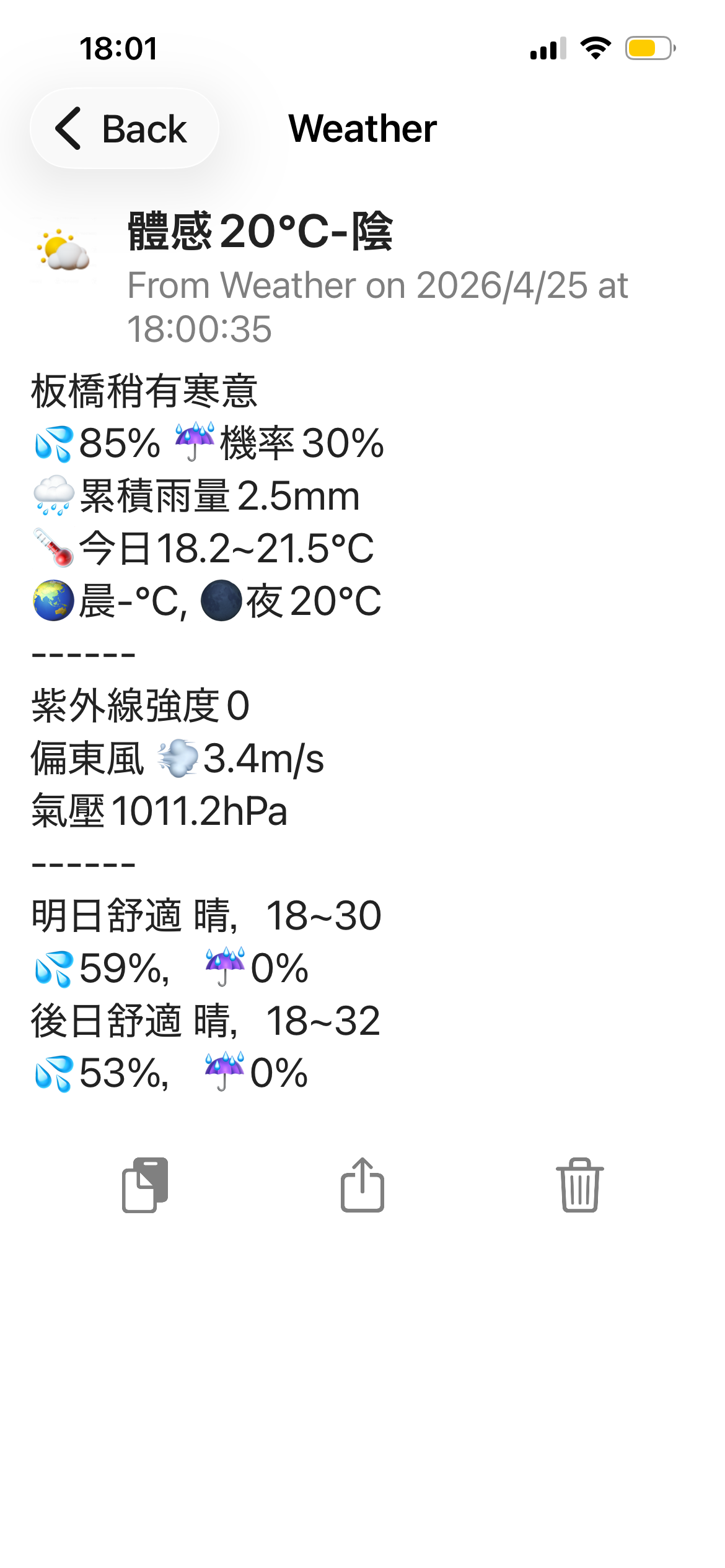
我之前一直通過n8n 使用OpenWeatherMap 的api 來獲取天氣和預報並通過pushover 發送到手機,但是,由於台灣是海島型氣候,天氣多變,預報往往不太準確,而比較權威的the weather channel 又不提供api,中央氣象署的api 其實我很早就註冊了,之前沒有AI 幫忙,他們的文檔又非常讓人困擾,所以沒有使用。
今天讓AI 看了一下他們的文檔,終於替換掉了OpenWeatherMap 的api 。
中央氣象署開放資料平臺之資料擷取API – https://opendata.cwa.gov.tw/dist/opendata-swagger.html#/
除了實時天氣之外,還有預報信息,由於台灣很小,所以可以具體到某一個區域,例如板橋區。
但問題在於,板橋區的實時天氣和預報是兩個不同的api,而UV index 則不是在所有的氣象監測站都有,比如板橋區就沒有,新北只有一個。
所以,為了生成這麼一條信息,需要調取三個api。
當然,首先您需要去註冊一個中央氣象署會員 – https://pweb.cwa.gov.tw/emember/register/authorization
註冊成功後,在會員資料部分,從“API授權碼” 中申請一個授權碼,您將會在後面的每一個api call 中使用他。
我記得我註冊的時候他還是中央氣象局,升級署了。
天氣預報api,板橋區監測站
https://opendata.cwa.gov.tw/api/v1/rest/datastore/F-D0047-069?Authorization=YOUR-CWB-API-KEY&LocationName=板橋區實時天氣api,距離我最近的監測站
https://opendata.cwa.gov.tw/api/v1/rest/datastore/O-A0001-001?Authorization=YOUR-CWB-API-KEY&StationId=C0AJ80UV index api, 只有比較大的站有。
https://opendata.cwa.gov.tw/api/v1/rest/datastore/O-A0003-001?Authorization=YOUR-CWB-API-KEY&StationId=466881之所以使用三個api 是因為實時天氣我選了距離我最近的一個,如果您不需要那麼準確,可以只用新北區的監測站就可以。
n8n 的 workflow 中,因為merge block 只支持兩個input,所以只能使用串行執行,如果只用兩個api 的話就可以merge ,稍快,但對於每個小時發送一次的天氣來說,這點時間差異其實沒有必要,串行就可以了。
workflow 大概這個樣子。
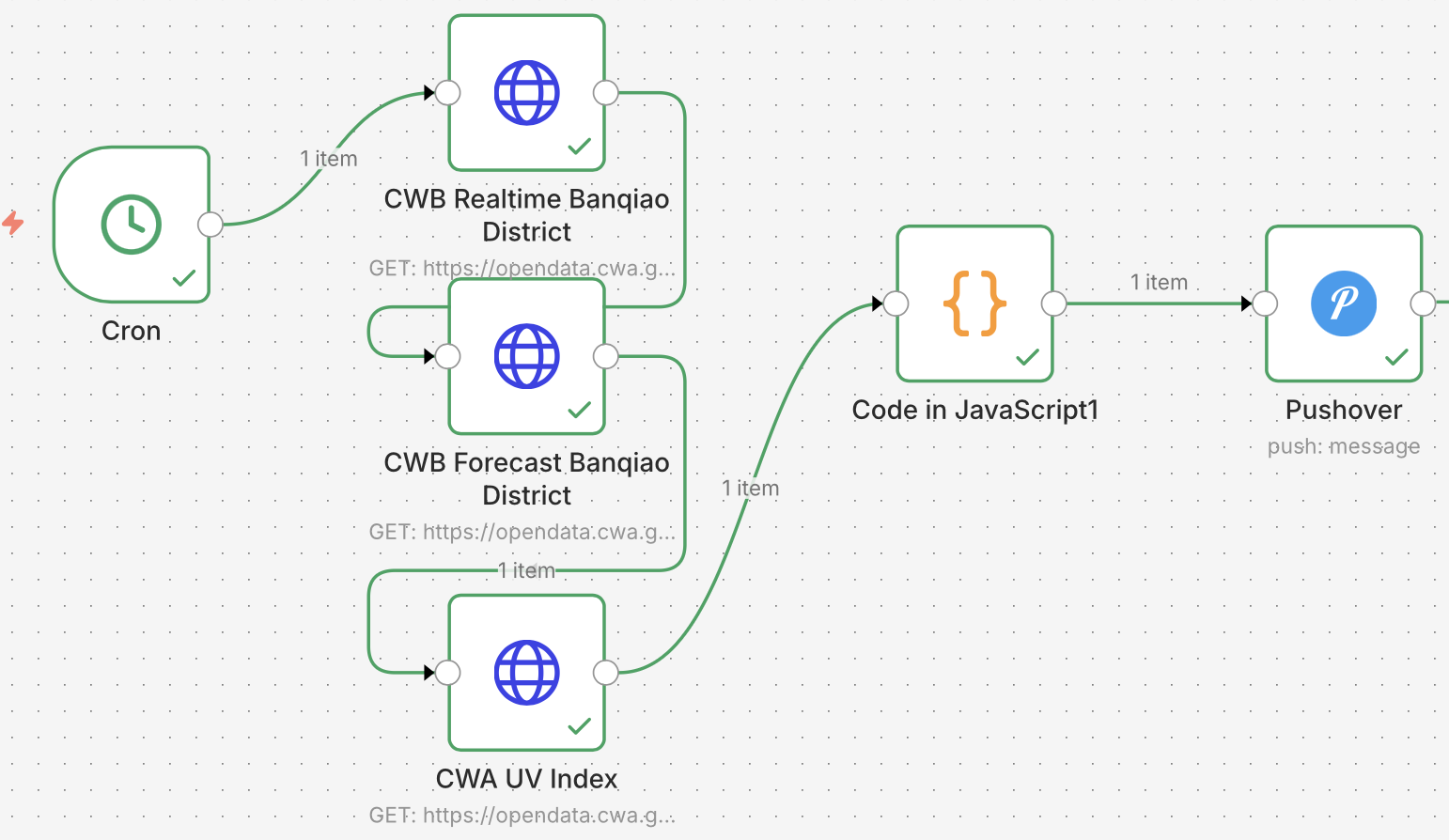
其中呢,code block 是把這三個api 的結果梳理一下,送給pushover。
const obs = $('CWB Realtime Banqiao District').first().json.records.Station[0];
const we = obs.WeatherElement;
const fc = $('CWB Forecast Banqiao District').first().json.records.Locations[0].Location[0];
const uvStation = $('CWA UV Index').first().json.records.Station[0].WeatherElement;

const el = {};
for (const e of fc.WeatherElement) el[e.ElementName] = e.Time;

const at = el['體感溫度'];
const pop = el['3小時降雨機率'];
const wx = el['天氣現象'];
const rh = el['相對濕度'];
const ci = el['舒適度指數'];

const days = {};
for (const t of at) {
  const d = t.DataTime.slice(0, 10);
  if (!days[d]) days[d] = {};
  const h = t.DataTime.slice(11, 13);
  if (h === '06') days[d].morn = t.ElementValue[0].ApparentTemperature;
  if (h === '12') days[d].day = t.ElementValue[0].ApparentTemperature;
  if (h === '21') days[d].night = t.ElementValue[0].ApparentTemperature;
}
for (const t of wx) {
  const d = t.StartTime.slice(0, 10);
  if (!days[d]) days[d] = {};
  if (t.StartTime.slice(11, 13) === '12') days[d].wx = t.ElementValue[0].Weather;
}
for (const t of pop) {
  const d = t.StartTime.slice(0, 10);
  if (!days[d]) days[d] = {};
  if (t.StartTime.slice(11, 13) === '12') days[d].pop = t.ElementValue[0].ProbabilityOfPrecipitation;
}
for (const t of rh) {
  const d = t.DataTime.slice(0, 10);
  if (!days[d]) days[d] = {};
  if (t.DataTime.slice(11, 13) === '12') days[d].rh = t.ElementValue[0].RelativeHumidity;
}
for (const t of ci) {
  const d = t.DataTime.slice(0, 10);
  if (!days[d]) days[d] = {};
  if (t.DataTime.slice(11, 13) === '12') days[d].comfort = t.ElementValue[0].ComfortIndexDescription;
}

const dayTemp = {};
for (const t of at) {
  const d = t.DataTime.slice(0, 10);
  const v = parseFloat(t.ElementValue[0].ApparentTemperature);
  if (!dayTemp[d]) dayTemp[d] = { min: v, max: v };
  if (v < dayTemp[d].min) dayTemp[d].min = v;
  if (v > dayTemp[d].max) dayTemp[d].max = v;
}

const sorted = Object.keys(days).sort();

return [{json: {
  station: obs.StationName,
  weather: we.Weather !== '-99' ? we.Weather : uvStation.Weather,
  temp: we.AirTemperature,
  humidity: we.RelativeHumidity,
  wind: we.WindSpeed,
  windDir: el['風向'][0].ElementValue[0].WindDirection,
  rain: we.Now.Precipitation,
  pressure: we.AirPressure,
  high: we.DailyExtreme.DailyHigh.TemperatureInfo.AirTemperature,
  low: we.DailyExtreme.DailyLow.TemperatureInfo.AirTemperature,
  pop: pop[0].ElementValue[0].ProbabilityOfPrecipitation,
  comfort: ci[0].ElementValue[0].ComfortIndexDescription,
  feelsLike: at[0].ElementValue[0].ApparentTemperature,
  uv: uvStation.UVIndex,
  d0_morn: days[sorted[0]]?.morn || '-',
  d0_night: days[sorted[0]]?.night || '-',
  d1_wx: days[sorted[1]]?.wx || '-',
  d1_comfort: days[sorted[1]]?.comfort || '-',
  d1_min: dayTemp[sorted[1]]?.min || '-',
  d1_max: dayTemp[sorted[1]]?.max || '-',
  d1_rh: days[sorted[1]]?.rh || '-',
  d1_pop: days[sorted[1]]?.pop || '-',
  d2_wx: days[sorted[2]]?.wx || '-',
  d2_comfort: days[sorted[2]]?.comfort || '-',
  d2_min: dayTemp[sorted[2]]?.min || '-',
  d2_max: dayTemp[sorted[2]]?.max || '-',
  d2_rh: days[sorted[2]]?.rh || '-',
  d2_pop: days[sorted[2]]?.pop || '-',
}}];
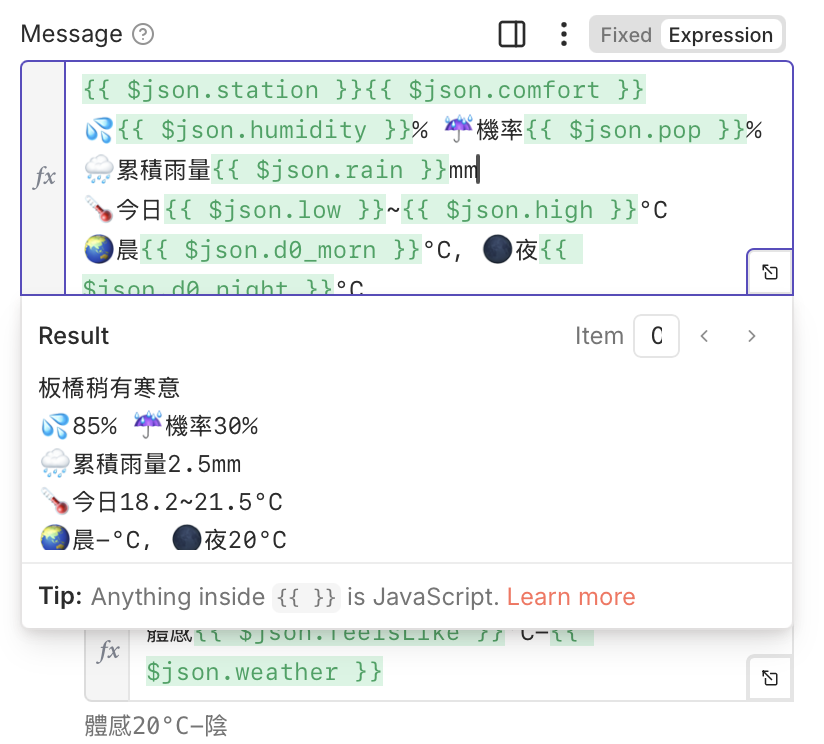
在pushover 的block 中將這些output 整理成人類看得懂的樣子。