偶也来赶赶时髦!Sqlite【注1】越来 越有流行的趋势,其实三年前我就知道它了,但是觉得它是个鸡肋,直到我正式的体会到了小型应用中,没必要使用mysql的时候,它,出现了……. 在小型的CMS和Blog中,使用大型的关系数据库是不明智的,管理复杂,不便迁移,sqlite是这样一个东西:

1.它易于使用,不需要配置,不需要安装,也不需要管理员帐户;
2.支持大部分SQL92命令;
3.一个完整的数据库保存为磁盘上的一个文件,同一个数据库文件可以在不同机器上使用;
4.最大支持数据库到2TB;
5.整个系统少于3万行代码,少于250KB的内存占用(gcc);
6.大部分应用比目前常见的 客户端/服务端 的数据库快;
7.没有其它任何环境依赖,源代码开放;
8.实属居家旅行,杀人越货之必备软件,建议人手一份。
在 我看来最重要的是小巧,快速,支持大部分SQL92命令,这么精美的一个东西,让我萌发了把以前那个mysql计数器转过来的想法,这个计数器代码很简 单,网上到处都是,我要做的呢,就是把里面的mysql部分修改为sqlite的,废话少说,先建个表了来,sqlite是独立启动的,还是使用和 mysql相同的数据库名,visit_log,不过,sqlite的后缀可以随便改,我们就用visit_log.db吧,建个 visit_counter表,添加一个integer叫做amount,插入一个数据52419,娃哈哈哈…….最后select 一下看对不对,额,下面这个输出应该是对的……

数据库搞定了,下面我们来改程序,这些代码大部分是现成的,sqlite部分的代码是我改的,我不是程序员,所以里面很可能还有冗余的东西……..首先是进行写数据库的程序页面,sqlite_count.php
———————————
<?php
$db=sqlite_open(“visit_log.db”); //打开数据库。
$result=sqlite_query($db,”select * from visit_counter LIMIT 0,3″); //取得表的所有内容
$record=sqlite_fetch_array($result);
if(empty($visited)){
$counter=$record[“amount”]+1;//提出数据并加1
$sqlite=”update visit_counter set amount=$counter”;//更新数据库
$result=sqlite_query($db,$sqlite);
}
switch(strlen($counter)){ //将counter变量格式化
case 1:
$counter=”00000″.$counter;
break;
case 2:
$counter=”0000″.$counter;
break;
case 3:
$counter=”000″.$counter;
break;
case 4:
$counter=”00″.$counter;
break;
case 5:
$counter=”0″.$counter;
break;
sqlite_close($db);//关闭数据库的连接
}?>
——————————-
然后呢是读数据库并且生成图形计数器的页面sqlite_count_show.php
——————————-
<?php
$db=sqlite_open(“visit_log.db”); //打开数据库。
$result=sqlite_query($db,”select * from visit_counter LIMIT 0,3″); //取得表的所有内容
$record=sqlite_fetch_array($result);
$Countershow=$record[“amount”];
switch(strlen($Countershow)){ //将counter变量格式化
case 1:
$Countershow=”00000″.$Countershow;
break;
case 2:
$Countershow=”0000″.$Countershow;
break;
case 3:
$Countershow=”000″.$Countershow;
break;
case 4:
$Countershow=”00″.$Countershow;
break;
case 5:
$Countershow=”0″.$Countershow;
break;
}
Header(“Content-type: image/png”);
$pic=imagecreate(43,16); //创建图像
$bkcolor=ImageColorAllocate($pic,255,255,255); //定义背景色
$fcolor=ImageColorAllocate($pic,0,0,255); //定义字体颜色
imageline($pic,0,0,50,17,$bkcolor);
imagestring($pic,3,1,1,$Countershow,$fcolor);
Imagepng($pic);
ImageDestroy($pic);
sqlite_close($db);//关闭数据库的连接
?>
———————————
把 这两个文件和visit_log.db放在一个目录就可以了,至于效果嘛,大家可以看看偶Blog的右下角,额,php5里面已经包含了sqlite,不 用另外安装,但是,php4需要另外安装,不要去看网上那些安装方法,完全是胡说八道睁着眼睛说瞎话,你抄我的我抄你的,windows下面的不说了,太 简单,unix下面,首先要执行pear install sqlite,然后还没完,需要修改php.ini里面的ext目录,指向正确的位置(如果你之前没安装过任何php ext的话就必然有这一步),否则你的phpinfo里面是不可能出现sqlite的,
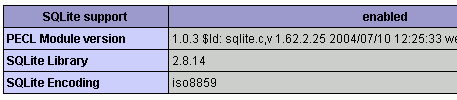
当然了,大部分人用它,是用来开发,而中国程序员的开发环境大多在windows下面,不用考虑这个问题,真正的web或者嵌入应用,现在似乎还没流行起 来(很多嵌入应用我们是不知道d~),我觉得,快了……..记得用sqlite2哈~php好像还没支持sqlite3……这个计数器只 是很简单的应用,sqlite当然可以支撑更多复杂的应用,但是我看好的是它在手持终端里面的应用,比如手机的通讯录,我这个moto a760就是用的 Berkeley DB XML,上次通讯录坏了,我找了半天愣是没找到修复数据库的方法……如果是sqlite就好了……
我在wap.kenbaby.org上面也加了一个计数器,大家可以用手机访问看看。
【注1】:About SQLite
———————
SQLite is a small C library that implements a self-contained, embeddable, zero-configuration SQL database engine. Features include:
* Transactions are atomic, consistent, isolated, and durable (ACID) even after system crashes and power failures.
* Zero-configuration – no setup or administration needed.
* Implements most of SQL92. (Features not supported)
* A complete database is stored in a single disk file.
* Database files can be freely shared between machines with different byte orders.
* Supports databases up to 2 terabytes (241 bytes) in size.
* Sizes of strings and BLOBs limited only by available memory.
* Small code footprint: less than 250KiB fully configured or less than 150KiB with optional features omitted.
* Faster than popular client/server database engines for most common operations.
* Simple, easy to use API.
* TCL bindings included. Bindings for many other languages available separately.
* Well-commented source code with over 95% test coverage.
* Self-contained: no external dependencies.
* Sources are in the public domain. Use for any purpose.
The SQLite distribution comes with a standalone command-line access program (sqlite) that can be used to administer an SQLite database and which serves as an example of how to use the SQLite library.